
Jack Frost Design - The Digital Agency
Have a question about AI Safe Zones or creating your own Strategic Relational AI? - Schedule a Conversation

AI Is Powerful.
But When It Focuses on the Wrong Documents,
It Can’t Be Trusted.
Copilot uses everything it can see—including outdated, duplicated, or irrelevant content.
Safe Zones limit its scope to just clean, curated data.
Safe Zones make sure Copilot sees only the current, correct, department‑approved files.

You don’t need to clean your entire intranet.
You only need a small, curated Safe Zone where Copilot can operate safely.
The real risk isn’t the mess itself — it’s how Copilot reacts to it.
Copilot’s Two Modes: Tactical and Strategic
Strategic Copilot is different. Ask it for a strategy and it draws on every file you have access to. In most tenants, that means outdated, duplicated, and conflicting files resulting in untrustworthy results.

Copilot's strategic scope is why experts advise you clean and label everything.
Tactical Copilot delivers exactly what you ask for — a draft, a summary, a calculation — based on the files you select.
Strategic Copilot sees everything you can access — Safe Zones keep it focused on trusted sources.

The Employee Path to Trusted Copilot
Employees need Copilot they can trust from the first day it’s deployed.
Safe Zones make that possible by:
Giving a department a curated environment where Copilot’s answers are always drawn from reliable, authoritative knowledge.
Ensuring that tactical Copilot (drafts, summaries, calculations) works exactly as expected.
Preventing strategic Copilot from pulling in messy, conflicting files that confuse employees or slow them down.
The result: employees start working productively with Copilot on day one — without the risks of messy, unfiltered data. Every Safe Zone rollout includes dedicated live training, delivered in two focused sessions and reinforced with recorded lessons that become an ongoing resource inside your intranet.
The Safe Zones Strategy
Here’s how each departmental Safe Zone is built:
Structure: A department receives a dedicated SharePoint Safe Zone site with its own curated library, linked Microsoft Team, and security groups.
Curated Content: Each Safe Zone starts with a tight set of 200–300 validated documents chosen for authority and relevance. Files are copied, not migrated, so existing systems and workflows remain untouched.
Scoped AI: Copilot’s strategic analysis is limited to the Safe Zone. Answers are always grounded in curated knowledge, not the noise of the tenant. Tactical Copilot still works on any file a licensed user selects, but broad “what should we do?” questions draw only from the Safe Zones.
Training: Each Safe Zone rollout includes dedicated live training, delivered in focused sessions to ensure employees quickly gain confidence with Copilot. The training is reinforced with recorded lessons sequenced into a curriculum that lives inside your intranet, giving teams a lasting reference and keeping the Zone trustworthy.
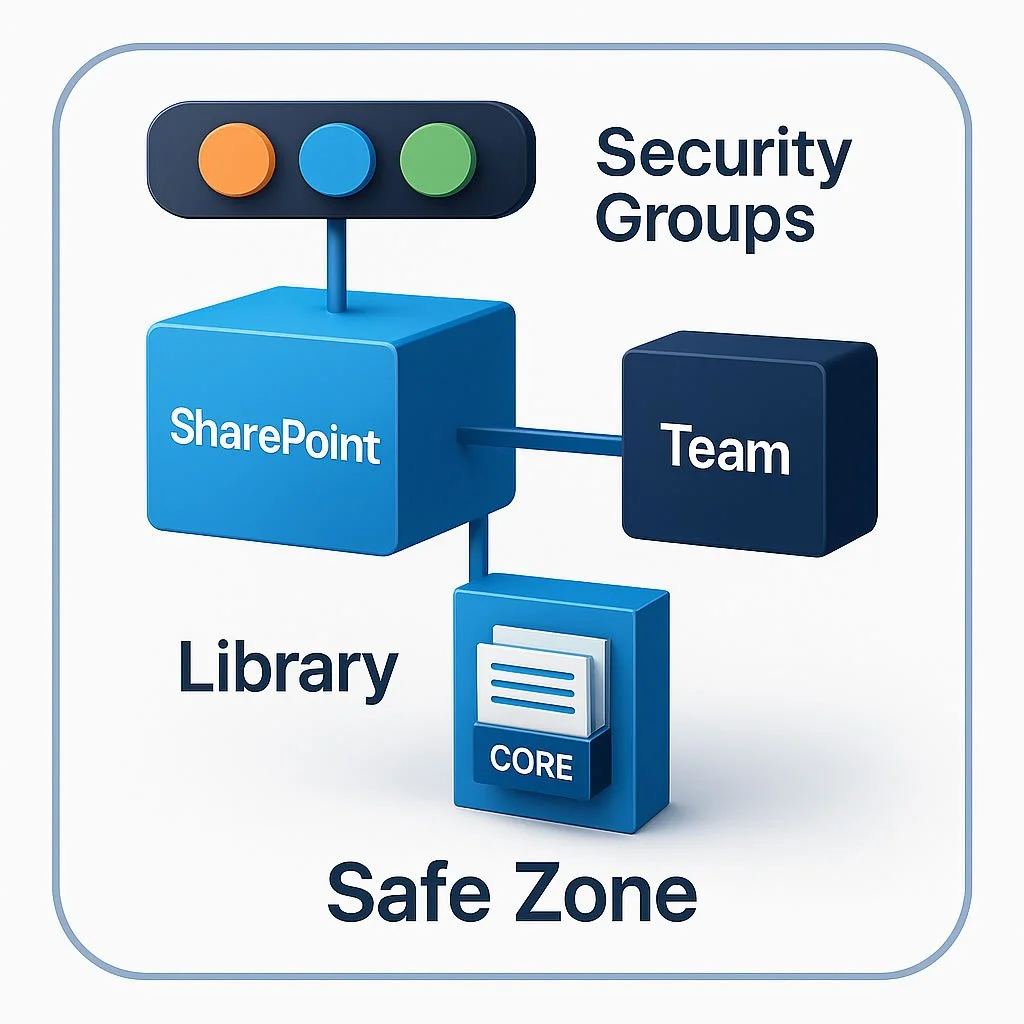
Safe Zones give Copilot a trustworthy foundation from day one.
The Metaphor
A Safe Zone is your department’s “trusted source folder.”
Your organization may have thousands of scattered, outdated, or duplicate files — but only the correct, current, and approved documents make it into this space.
That’s what a Safe Zone gives Copilot:
a protected set of trusted answers, so your team gets reliable guidance every time and makes decisions
with confidence, not guesswork.

Unlock Strategic Clarity Across Departments
When each department has a Safe Zone, cross‑department answers become accurate instead of contradictory.
Safe Zones together create a
Strategic Relational AI
for your organization
In just 1 minute, the Strategy Fit Test uses your own AI to confirm if Safe Zones remove risk, sidestep cleanup, avoid disruption and provide fast trustworthy adoption.
No theory — direct validation.
Find Out if Safe Zones Are Right for You
Start small, prove value, expand with confidence.